
BoltShot
BoltShot is a simple, ultra-fast API that transforms any URL into high-quality screenshots without the need for browser operations.
Visit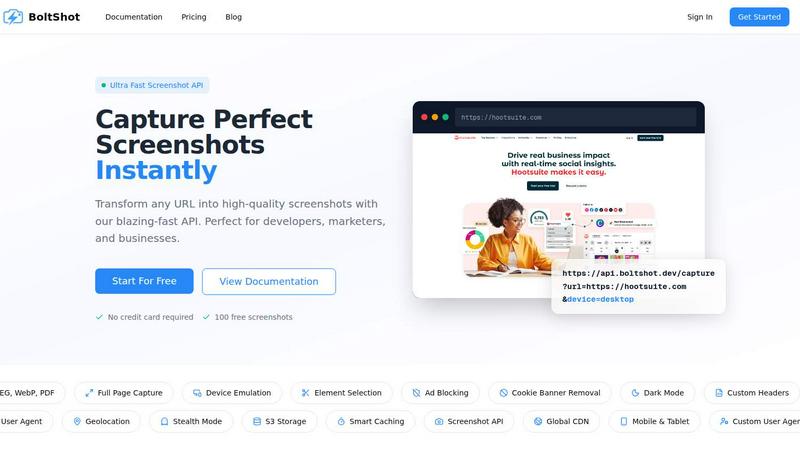
About BoltShot
BoltShot is a high-performance website screenshot API designed to transform any URL into pixel-perfect screenshots with exceptional speed and reliability. At its core, BoltShot eliminates the complexity of managing headless browser infrastructure, allowing developers and businesses to capture web pages in multiple formats including PNG, JPEG, WebP, and PDF through a simple API request. The platform supports full-page capture capabilities, enabling users to document entire web pages from top to bottom without missing any content. Device emulation features allow for precise rendering across mobile, tablet, and desktop viewports, while custom viewport settings provide flexible control over the capture dimensions. BoltShot goes beyond basic screenshot functionality by offering advanced capabilities such as CSS selector-based element targeting, ad blocking, cookie banner removal, and smart caching to produce clean, distraction-free images. For developers and businesses requiring sophisticated integration, BoltShot provides S3 uploads with CDN delivery, custom user agents, geolocation emulation, stealth mode, and custom headers. The platform is purpose-built for professionals who need reliable, automated screenshot generation for e-commerce previews, automated reporting, web archiving, testing workflows, compliance monitoring, and numerous other applications. By handling all the underlying browser management and infrastructure concerns, BoltShot enables teams to focus on their core product development rather than maintaining complex screenshot pipelines. With a 99.9% success rate, sub-100ms response times, and global CDN delivery, BoltShot delivers enterprise-grade performance that scales with demanding production workloads.
Features of BoltShot
Multi-Format Output and Full Page Capture
BoltShot supports four distinct output formats including PNG, JPEG, WebP, and PDF, giving users flexibility in how they store and utilize captured screenshots. The full-page capture feature automatically scrolls through entire web pages to create comprehensive documentation of long-form content, landing pages, or data-heavy interfaces. This eliminates the need for manual stitching of multiple screenshots and ensures that nothing is missed when capturing dynamic or content-rich websites. Users can specify their preferred format within the API request parameters, making integration straightforward for any application.
Device Emulation and Custom Viewports
The platform provides robust device emulation capabilities that allow users to simulate how websites appear on mobile phones, tablets, and desktop computers using predefined viewport presets. Beyond standard device profiles, BoltShot enables custom viewport settings where developers can specify exact pixel dimensions for unique rendering requirements. This feature is essential for responsive design testing, ensuring that web applications display correctly across all target devices without requiring physical device testing or complex emulation setups.
Element Targeting with CSS Selectors
BoltShot offers precise element targeting through CSS selector support, allowing users to capture specific components of a webpage rather than the entire page. This capability is invaluable for generating consistent product images, capturing specific data visualizations, or documenting particular UI elements for testing and review purposes. Developers can pass CSS selectors as parameters in the API request to isolate exactly what needs to be captured, resulting in cleaner, more focused screenshots that enhance workflow efficiency.
Clean Capture with Ad Blocking and Cookie Removal
The platform includes automatic cleaning features that remove distractions from captured screenshots, including advertisements, cookie consent banners, popups, and modal overlays. Ad blocking filters out intrusive advertisements that can clutter images and obscure important content, while cookie banner removal eliminates the ubiquitous consent popups that appear on modern websites. Additionally, BoltShot removes overlays and notification popups, ensuring that every screenshot presents a clean, professional appearance suitable for documentation, presentations, or client deliverables.
Use Cases of BoltShot
E-Commerce Product Previews and Listings
E-commerce platforms can leverage BoltShot to automatically generate high-quality product previews from merchant websites or product pages. By using element targeting with CSS selectors, businesses can capture specific product images, pricing information, or entire product listings for inclusion in catalogs, comparison tools, or marketplace integrations. The full-page capture feature ensures that complete product descriptions and specifications are documented, while device emulation allows for previews optimized for mobile shoppers or desktop browsing experiences.
Automated Reporting and Dashboard Documentation
Organizations that rely on data dashboards and reporting tools can use BoltShot to automatically capture screenshots of key metrics and visualizations at scheduled intervals. This enables the creation of visual audit trails, performance snapshots, and historical records of data changes over time. The clean capture features ensure that reports are free from extraneous UI elements, while the multi-format output allows for easy integration into PDF reports, slide decks, or internal documentation systems.
Web Archiving and Compliance Monitoring
Companies in regulated industries can utilize BoltShot for web archiving purposes, capturing snapshots of web pages at specific points in time to maintain compliance records. The platform's stealth mode and custom user agent capabilities allow for consistent, undetected captures that accurately represent what users see. Full-page capture ensures that complete web pages are archived, while geolocation emulation enables testing of region-specific content and compliance with local regulations.
Visual Regression Testing and QA Workflows
Development teams can integrate BoltShot into their continuous integration pipelines to perform visual regression testing on web applications. By capturing screenshots before and after code changes, teams can automatically detect unintended visual differences that might break user experiences. Device emulation allows for cross-platform testing, while element targeting enables focused testing on specific components. The smart caching feature reduces redundant captures, making testing workflows more efficient and cost-effective.
Frequently Asked Questions
What output formats does BoltShot support?
BoltShot supports four primary output formats: PNG, JPEG, WebP, and PDF. PNG is ideal for high-quality images with transparency support, JPEG offers compressed file sizes suitable for web use, WebP provides modern compression with excellent quality-to-size ratios, and PDF is perfect for document generation and archiving. Users can specify their preferred format as a parameter in the API request, and the platform automatically handles the conversion process.
How does device emulation work in BoltShot?
BoltShot provides predefined viewport presets for mobile, tablet, and desktop devices that simulate how websites render on different screen sizes. Users can also specify custom viewport dimensions for unique requirements. The emulation includes proper handling of device pixel ratios, touch event simulation, and responsive design behaviors. This allows developers to test and capture screenshots across multiple device profiles without maintaining physical devices or complex emulation setups.
Can I capture specific elements of a webpage instead of the whole page?
Yes, BoltShot supports element targeting using CSS selectors, allowing you to capture specific components of a webpage with precision. You can pass CSS selectors as parameters in your API request to isolate particular divs, images, tables, or any other HTML elements. This feature is particularly useful for generating consistent product images, capturing specific data visualizations, or documenting particular UI elements for testing and review purposes.
What happens to my screenshots after they are captured?
BoltShot offers flexible storage options for captured screenshots. Users can choose to have images uploaded directly to their Amazon S3 buckets with CDN delivery for fast global access. The platform also provides smart caching capabilities that store frequently requested screenshots to reduce processing time and API costs. Screenshots are delivered with sub-100ms response times through the global CDN, and users maintain full control over their data with custom storage configurations.
Pricing of BoltShot
BoltShot offers a straightforward pricing model designed for developers and businesses of all sizes. New users can start with 100 free screenshots without requiring a credit card, allowing them to test the platform's capabilities before committing to a paid plan. The free tier provides full access to all features including multi-format output, device emulation, element targeting, and clean capture capabilities. For production workloads, BoltShot offers scalable pricing based on screenshot volume, with dedicated plans available for high-volume users requiring advanced features like S3 storage and custom integrations. Detailed pricing information for paid tiers is available on the BoltShot pricing page, with options suitable for individual developers, growing teams, and enterprise organizations.
Similar to BoltShot

Discover verified SaaS, practical AI tools, and custom n8n workflows on an architecture-first discovery platform built for modern builders.

A free launch checklist for SaaS, apps, AI tools and more. Every step says why it matters and when you can skip it.

From first scene to published 2D game, no code

Free online screen test — diagnose dead pixels, lines, color issues & flicker. No download.

The #1 Native Form Builder Plugin for Framer - No Code, No Embeds, No External Platforms.

Chat with random strangers online for free on ChatIt.me. Enjoy safe, anonymous, and instant 1-on-1 conversations with people worldwide

Fast, free, and privacy-first browser tool to convert, crop, resize, and compress images locally without server uploads.
