
JustPDF
JustPDF is a privacy-first, browser-based toolkit with 17 free tools to edit and convert PDFs without uploading your files.
Visit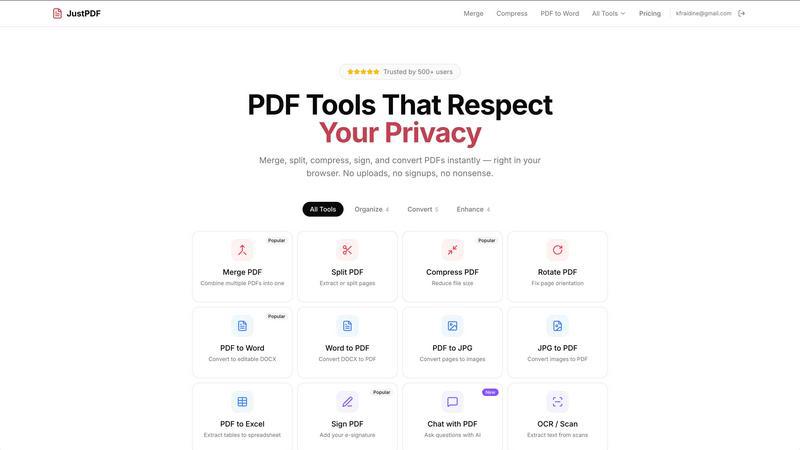
About JustPDF
JustPDF is a revolutionary suite of PDF tools designed with a core principle: uncompromising privacy and user control. It provides 17 professional-grade utilities for managing, converting, and editing PDF documents entirely within your web browser. Unlike traditional online services such as Smallpdf or iLovePDF, which require uploading your sensitive files to remote servers, JustPDF leverages advanced JavaScript and WebAssembly technology to process all files locally on your device. This means your documents never leave your computer or phone; they are processed in complete isolation, a fact you can verify yourself by monitoring the Network tab in your browser's developer tools. The platform caters to a wide audience, including students, professionals, legal teams, healthcare workers, and anyone concerned with data security, offering a robust, FERPA-compliant solution for educational use. Its main value proposition is delivering powerful, convenient PDF functionality without sacrificing the confidentiality of your data, all through a simple, accessible web interface.
Features of JustPDF
100% Browser-Based Processing
This is the cornerstone feature of JustPDF. All 17 tools operate using client-side JavaScript and WebAssembly, meaning all file processing happens directly within your browser's memory. Your PDFs are never uploaded to any external server. This ensures maximum privacy and security, as you retain full ownership and control of your documents from start to finish. You can even use the tools offline after the initial page load, providing flexibility and reliability regardless of your internet connection.
Comprehensive PDF Tool Suite
JustPDF consolidates a wide array of essential PDF tasks into one seamless platform. The suite includes tools for organization (Merge, Split, Rotate, Compress), security (Unlock, Sign), and conversion (PDF to Word, JPG, Excel, and vice versa). It also supports modern image formats like WebP and HEIC for conversion to PDF and includes advanced features like PDF to Grayscale, OCR/Scan for making scanned documents searchable, and an innovative AI-powered Chat with PDF tool for interactive document analysis.
No-Account Free Tier
Users can immediately access the full functionality of JustPDF without any mandatory registration. The free tier allows for 3 operations per day across all tools, with no watermarks added to processed files. This frictionless access model emphasizes user convenience and allows anyone to test the platform's capabilities and experience its privacy-first approach before considering an upgrade to a paid plan.
FERPA-Compliant Security
JustPDF is explicitly designed to meet the stringent data privacy requirements of educational environments under FERPA (Family Educational Rights and Privacy Act). Because files are processed locally and never transmitted to the company's servers, student records, graded papers, and sensitive academic documents can be handled with confidence. This compliance makes it a trusted tool for teachers, administrators, and students who need to manage educational PDFs securely.
Use Cases of JustPDF
Handling Sensitive Legal or Business Documents
Lawyers, consultants, and business professionals often work with confidential contracts, financial reports, and client information. Using JustPDF to merge, split, compress, or sign these PDFs ensures that sensitive data remains exclusively on the user's device, mitigating the risk of a data breach associated with cloud-based uploads. This is critical for maintaining client confidentiality and adhering to data protection regulations.
Student and Academic Workflow
A student can use JustPDF to compile research papers from multiple PDF sources, convert lecture slides from PDF to Word for note-taking, or compress a large portfolio file for email submission. Since the tool is FERPA-compliant, university staff can also securely redact information, merge student records, or sign official forms without exposing protected student data to third-party servers.
Preparing Digital Applications and Forms
Individuals applying for jobs, visas, or government services frequently need to manage PDF forms—signing them, combining them with supporting documents like scans of passports or certificates (JPG/HEIC to PDF), and compressing the final package for upload. JustPDF allows for this entire preparation process to be done privately on a home computer, keeping personal identification documents secure.
Everyday Personal Document Management
For personal use, JustPDF simplifies common tasks like combining multiple receipts into one PDF for expense tracking, rotating a scanned document that was fed into the scanner incorrectly, converting a PDF recipe to a Word document for easy editing, or extracting a single page from a large manual. The free, no-sign-up tier makes these quick tasks simple and secure for anyone.
Frequently Asked Questions
Is my data really secure with JustPDF?
Yes, absolutely. JustPDF's technology is fundamentally different from other online PDF tools. All processing is executed locally on your device using your browser's computational power. Your files are never sent over the internet to JustPDF's or any other servers. You can confirm this by opening your browser's Developer Tools (F12), going to the Network tab, and observing that no file data is uploaded when you perform an operation.
What does "works offline" mean?
Once you load the JustPDF website in your browser, the core application code (including the WebAssembly modules that power the tools) is cached. This means you can subsequently use most tools without an active internet connection. You can select files from your local device, process them, and download the result entirely offline. An initial internet connection is only required to first load the website.
What is the "Chat with PDF" feature?
This is an AI-powered tool that allows you to interact with your PDF document conversationally. After processing the PDF locally in your browser, you can ask the AI questions about its content, such as "Summarize this report," "List the key points from page 3," or "Find all mentions of a specific term." It helps you quickly analyze and extract information from lengthy documents without manually reading through every page.
What are the limits of the free tier?
The free tier of JustPDF allows you to perform 3 total operations per day. An "operation" is any single task, such as merging one set of files, compressing one PDF, or converting one document. There are no file size limits for the free tier, and processed files contain no watermarks. Your free uses reset daily, and no user account is required to access them.
Pricing of JustPDF
JustPDF operates on a freemium model. Users have access to a robust free tier that allows for 3 operations per day without any account registration. For users requiring unlimited access, the Pro subscription plan starts at $4 per month. This paid plan removes the daily operation limit, providing unrestricted use of all 17 professional-grade PDF tools while maintaining the same 100% browser-based, private processing.
Explore more in this category:
Similar to JustPDF

ROIpad delivers live competitive intelligence for SaaS teams. Track competitor moves and market signals to uncover messaging angles that drive revenue

All-in-one POS, inventory, accounting and HR software for Bangladeshi SMEs — real-time sales, stock and finance in one place.

AI meeting notes, transcripts, summaries and action items on iPhone, iPad and Android.

ButterShare is a browser-based peer-to-peer file transfer tool that lets you send large files and folders directly between devices without signup or c

Free light screen tool online. Turn any display into a flashlight, ambient light, or solid-color screen. No download or sign-up.

AI Email Filter sorts incoming mail into folders using plain-language prompts you write. Works with any IMAP mailbox; bring your own LLM if you want.

LeadsReddit helps founders, marketers, and sales teams find people on Reddit who are actively looking for what they sell. Instead of scrolling through

AI interview platform to screen resumes, run 10-language voice interviews, and rank top talent automatically.