
KPI Studio
Transform your data into stunning video animations in under 60 seconds with KPI Studio, no design skills needed.
Visit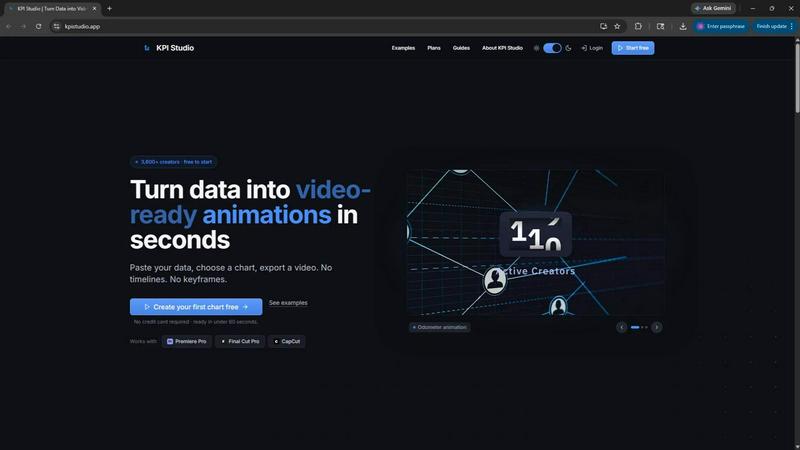
About KPI Studio
KPI Studio is a revolutionary tool designed for data-driven video creators who require dynamic charts in their videos but may lack the time or expertise for traditional motion design. This platform addresses the common frustrations faced by content creators, including the amateur appearance of screenshots, the inflexibility of Canva templates, the time-consuming nature of After Effects, and the unpredictability of AI-generated visuals. KPI Studio streamlines the entire process, allowing users to seamlessly transform their data into fully animated, video-ready visuals in under 60 seconds. By simply pasting data, selecting a chart type, and exporting, creators can enhance their videos with professional-grade animations. The tool is particularly beneficial for those on tight publishing schedules, ensuring that charts are readily available when needed. Additionally, advanced users can export their data in JSON format for deeper customization and integration into existing workflows, making KPI Studio an invaluable asset for any content creator focused on delivering high-quality video content efficiently.
Features of KPI Studio
Quick Data Integration
With KPI Studio, users can paste their data directly into the platform, instantly transforming raw numbers into visually appealing charts. This feature eliminates the need for extensive design work or technical expertise, allowing anyone to create professional animations quickly and easily.
Diverse Chart Options
The platform offers a wide array of chart types to choose from, including growth counters, animated bar charts, and line charts. This variety ensures that creators can select the most effective visual representation for their data, catering to different storytelling needs and audience preferences.
Fast Export Capabilities
KPI Studio enables users to export their animated visuals in various formats, including MP4, GIF, MOV, and PNG with transparency. This flexibility allows creators to seamlessly integrate their charts into popular editing software such as Premiere Pro, Final Cut, or CapCut without the need for additional editing.
JSON Export for Advanced Users
For those needing more customization, KPI Studio provides a JSON export option. This feature allows advanced users to manipulate their data further, integrating it into custom pipelines and workflows, offering a level of flexibility that meets the demands of complex projects.
Use Cases of KPI Studio
Social Media Content Creation
Content creators focusing on social media can leverage KPI Studio to produce eye-catching animated visuals that enhance viewer engagement. By integrating animated charts into their posts, they can communicate data effectively while maintaining a polished and professional appearance.
YouTube Video Enhancements
YouTubers can use KPI Studio to quickly add dynamic charts to their videos, making data-driven insights more visually appealing. This tool helps creators save time while enhancing the overall quality of their content, which can lead to increased viewer retention and engagement.
Marketing Reports and Presentations
Marketers can utilize KPI Studio to create animated charts for reports and presentations. The ability to produce professional visuals in minutes allows for timely updates and impressive presentations that effectively communicate key performance indicators to stakeholders.
Educational Content Development
Educators and eLearning developers can benefit from KPI Studio by incorporating animated visuals into their instructional materials. This helps to illustrate complex data and concepts more clearly, enhancing the learning experience and improving student engagement.
Frequently Asked Questions
How does KPI Studio work?
KPI Studio allows users to paste their data into the platform, choose a chart type, and export a fully animated visual in under 60 seconds. It eliminates the complexities of traditional motion design tools.
What formats can I export my charts in?
Users can export their animated visuals in various formats, including MP4, GIF, MOV, and PNG with transparency. This ensures compatibility with most video editing software.
Is there a free trial available?
Yes, KPI Studio offers a free plan that allows users to try out the tool with no credit card required. This includes three animated exports and unlimited PNG exports.
Can I integrate KPI Studio with other workflows?
Absolutely. KPI Studio offers a JSON export feature that allows advanced users to integrate their animated charts into custom workflows, providing flexibility for more complex projects.
Similar to KPI Studio

EffectSnap is a free online motion graphics toolkit for video editors. Create, customize, and export eye-catching motion effects, animations, transiti

Seedance 2.5 is a multimodal AI video generator for cinematic 30-second videos with high-fidelity reference control and AI video editing.

Turn TikTok, Reels, Shorts, Facebook videos, audio, and video into accurate timestamped transcripts with TXT, SRT, and VTT exports.

Create AI videos, images, avatars, and audio in one creative workspace.


AI UGC video ad Generator which Turn a URL, prompt, or template into a ready video ads

AI YouTube thumbnail maker that helps creators generate high-click thumbnails faster.

AI English for classrooms, built by a teacher.