
Meme Library
Meme Library is a free, private meme organizer that lets you search memes by text inside images, save from anywhere, and backup your collection.
Visit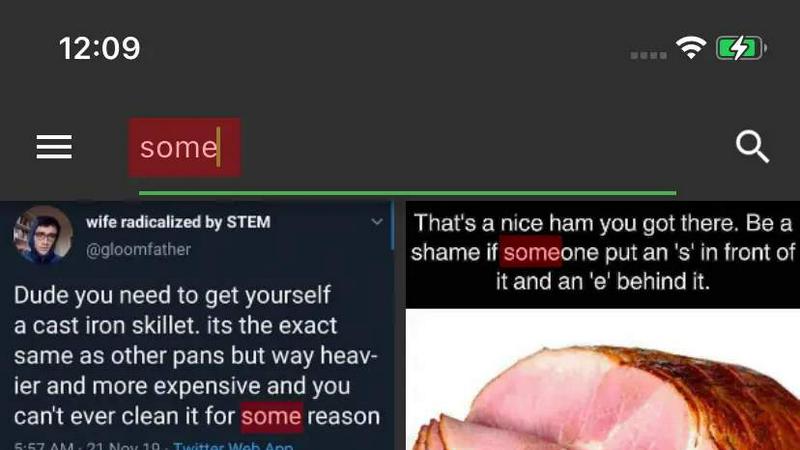
About Meme Library
Meme Library is a dedicated application designed to solve a specific and growing problem for digital users: the chaotic, disorganized, and often lost collection of memes, reaction images, and screenshots scattered across a device's camera roll. At its core, Meme Library is a private, searchable, and lightweight vault that serves as the single home for your entire meme collection. The product addresses the common frustration of endlessly scrolling through thousands of photos to find the perfect reaction image or a specific inside joke. It allows users to save memes from virtually any source, including popular websites like Instagram and Reddit, directly from a browser, or from the device's gallery and share sheet. The primary value proposition is efficiency and organization. Meme Library employs advanced optical character recognition technology to enable users to search for memes by the actual text contained within the image, making it possible to find a screenshot of a tweet or a specific caption without needing to remember the file name or date. The application is built with a strong emphasis on user privacy, operating entirely on-device with no social feeds, no forced sharing, and no tracking. It is specifically designed for "meme people," meaning individuals who use memes as a primary form of communication and need fast recall and fast sharing capabilities. For users concerned about data loss, Meme Library offers a secure backup and restore feature, ensuring that a carefully curated collection survives device upgrades or reinstallation. It is a focused, bloat-free tool that prioritizes speed, cleanliness, and utility over unnecessary features, making it an indispensable utility for anyone who values their digital humor library.
Features of Meme Library
Text Search Inside Images
This is the flagship feature of Meme Library, setting it apart from standard photo gallery apps. The application uses optical character recognition (OCR) technology to scan and index all text visible within your saved memes. This includes captions, meme text, screenshots of tweets, screenshots of screenshots, and any other textual overlay. Once indexed, users can simply type a word or phrase into the search bar to instantly retrieve any meme containing that text. This eliminates the need to manually scroll through hundreds of images trying to remember what a specific meme looked like, dramatically reducing the time spent searching for the perfect reaction or joke.
Save From Anywhere
Meme Library is designed for seamless integration into the user's existing workflow. It is not a walled garden that requires manual file imports. Instead, it leverages the operating system's share sheet and browser integration to allow users to save memes directly from any source. This includes saving from social media platforms like Instagram and Reddit, from a web browser, from the device's native gallery, or from any other app that supports sharing. This frictionless saving process ensures that users can quickly capture and archive a meme the moment they see it, without interrupting their browsing or scrolling experience.
Backup and Restore
Recognizing that a meme collection can be a valuable and deeply personal digital asset, Meme Library provides a robust backup and restore function. This feature allows users to create a secure, encrypted backup of their entire collection, including all images and their associated text indexes. This backup can be stored in a cloud service of the user's choice or on local storage. When upgrading to a new phone or reinstalling the app, the restore function can seamlessly bring back the entire library exactly as it was. This provides peace of mind, ensuring that hours of curation are never lost due to device failure or a simple upgrade.
Private by Default
Meme Library is built on a foundation of user privacy and data security. Unlike many social media or content management applications, this tool operates entirely on the user's device. All images are stored locally, and all text indexing and searching happen on-device without any data being sent to external servers. There are no social feeds, no public profiles, and no forced sharing mechanisms. The application explicitly states it does not engage in tracking or data collection. This design philosophy ensures that users have complete control over their collection, and their browsing habits or meme preferences remain strictly private.
Use Cases of Meme Library
Finding the Perfect Reaction Meme
The most common use case for Meme Library is the rapid retrieval of reaction memes during conversations. A user might remember a specific meme where a character says "That's what she said" but cannot find it in their camera roll. Using the Text Search feature, they can simply type "that's what she said" into the search bar. The app will instantly display all memes containing that exact text, allowing the user to select and share the perfect reaction within seconds, dramatically improving the speed and quality of their online communication.
Organizing a Personal Meme Archive
For meme enthusiasts and digital hoarders, Meme Library serves as a dedicated, organized archive. Instead of having memes scattered across multiple folders in a gallery app, mixed with personal photos and screenshots, users can save everything directly into Meme Library. This creates a clean, focused vault that is exclusively for memes. The search functionality means they never need to manually sort or tag images; they can rely on text-based retrieval to find any meme, making the archive both comprehensive and instantly navigable.
Preserving Internet Culture and Inside Jokes
Meme Library is an excellent tool for preserving pieces of internet culture and inside jokes shared within a friend group. Users can save screenshots of funny conversations, viral tweets, or niche memes that might otherwise be lost to time or buried in chat logs. The backup and restore feature ensures that this collection of shared humor persists across device upgrades. Years later, a user can search for a specific phrase from an old inside joke and instantly recall the associated meme, preserving a digital history of shared laughter.
Streamlining Content Creation
Content creators, such as social media managers or video editors, often need to quickly find specific visual references or reaction images. Meme Library streamlines this workflow by providing a centralized, searchable database. A creator can save memes from various sources during their research phase. Later, when editing a video or drafting a post, they can search for a meme by its text content to find the perfect visual element. This eliminates the time-consuming process of browsing through multiple folders or browser tabs, increasing productivity and creative efficiency.
Frequently Asked Questions
How does the text search inside images work?
The text search feature relies on Optical Character Recognition (OCR) technology. When you save a meme to your library, the app automatically scans the image for any visible text. This text is then indexed and stored locally on your device. When you perform a search, the app compares your query against this locally stored index. It can recognize text from various sources, including meme captions, screenshots of tweets, and even text within screenshots of screenshots. The entire process happens on your device, ensuring your data remains private.
Can I save memes from any app or website?
Yes, Meme Library is designed to work seamlessly with the standard share functionality of your device. From almost any app that allows sharing, such as Instagram, Reddit, Twitter, or your web browser, you can select the "Share" option and choose Meme Library from the list of available apps. The meme will then be saved directly into your library. You can also save memes from your device's native gallery or camera roll by using the import function within the app.
Is my meme collection private and secure?
Absolutely. Meme Library is built with a "Private by Default" philosophy. All your memes and their associated text indexes are stored exclusively on your local device. The application does not upload your images to any cloud server for processing, nor does it create a social feed or share your data with third parties. There is no tracking or analytics software embedded in the app. Your collection is for your eyes only, and you have complete control over it.
What happens to my memes if I get a new phone?
Your collection is safe thanks to the built-in Backup and Restore feature. Before switching phones, you can create a backup of your entire library, including all images and their search indexes. This backup can be saved to your preferred cloud storage service (like Google Drive or iCloud) or to a local file on your computer. Once you install Meme Library on your new phone, you can use the Restore function to import that backup. Your entire collection, with all its searchable text, will be exactly as you left it.
Pricing of Meme Library
Meme Library is available for free. The application currently has no premium tiers, subscription fees, or in-app purchase requirements. All features, including text search, saving from anywhere, backup and restore, and the ad-free experience, are included in the free version. The product is supported by its creators as a utility tool for the community, focusing on providing a clean, functional, and private experience without monetization barriers.
Explore more in this category:
Similar to Meme Library

Apps and files on an infinite canvas where people and AI agents work together.

ROIpad delivers live competitive intelligence for SaaS teams. Track competitor moves and market signals to uncover messaging angles that drive revenue

All-in-one POS, inventory, accounting and HR software for Bangladeshi SMEs — real-time sales, stock and finance in one place.

AI meeting notes, transcripts, summaries and action items on iPhone, iPad and Android.

ButterShare is a browser-based peer-to-peer file transfer tool that lets you send large files and folders directly between devices without signup or c

Free light screen tool online. Turn any display into a flashlight, ambient light, or solid-color screen. No download or sign-up.

AI Email Filter sorts incoming mail into folders using plain-language prompts you write. Works with any IMAP mailbox; bring your own LLM if you want.

LeadsReddit helps founders, marketers, and sales teams find people on Reddit who are actively looking for what they sell. Instead of scrolling through