
Caesura
Caesura is a macOS menu-bar app that reminds you to drink water, stretch, rest your eyes, and breathe, pausing during calls.
VisitPublished on:
June 26, 2026
Pricing:
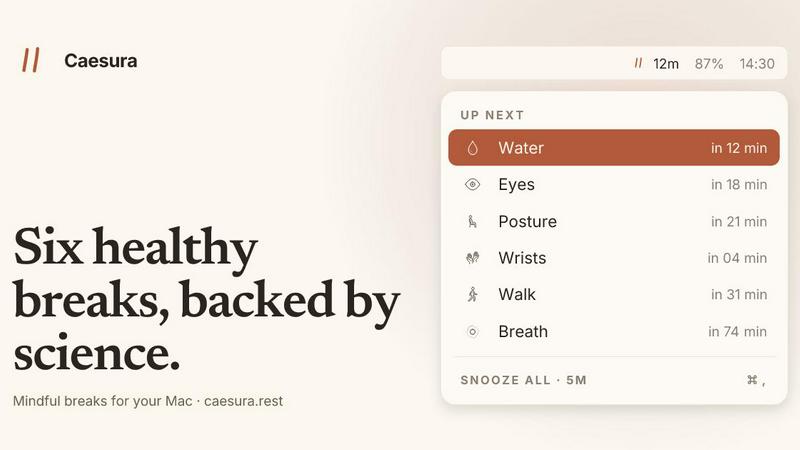
About Caesura
Caesura is a calm, focused macOS menu-bar break manager designed specifically for knowledge workers, developers, designers, and anyone who spends extended hours at a desk. Unlike noisy, subscription-based wellness apps that bombard you with notifications, Caesura operates quietly in the background, delivering science-backed reminders for six essential habits: drinking water, walking, stretching your wrists, resting your eyes, checking your posture, and breathing. Each reminder runs on its own independent schedule, with intervals drawn directly from peer-reviewed research rather than arbitrary round numbers. The product's core innovation is its coalescing system: when two reminders fall within a minute of each other, Caesura merges them into a single, gentle break notification, ensuring you are never interrupted twice in a row. It also intelligently pauses all timers when it detects you are on a video call, screen sharing, using a fullscreen app, or in a Focus mode, then resumes exactly where it left off. No accounts, no telemetry, no subscriptions. Caesura is a one-time purchase for $15, with a free 14-day trial, and requires macOS 14 or later. Its value proposition is simple: timely, unobtrusive nudges that keep you healthy without breaking your flow.
Features of Caesura
Six Science-Backed Break Types
Caesura targets six specific habits, each with an interval derived from scientific studies rather than arbitrary defaults. Drink water every 45 minutes, walk every 60 minutes, roll your wrists every 30 minutes, rest your eyes every 20 minutes, shift your posture every 30 minutes, and practice paced breathing every 90 minutes. Each break includes a link to the supporting research, so you can verify the evidence behind the reminder. You can also turn any break off individually or adjust its interval to suit your personal preferences.
Intelligent Coalescing and Flow Respect
When two or more break reminders become due within one minute of each other, Caesura automatically merges them into a single, unified prompt. This prevents the frustration of back-to-back interruptions. Furthermore, Caesura actively monitors your system for video calls, screen sharing, fullscreen applications, Do Not Disturb mode, calendar events, and games. When any of these activities are detected, all timers freeze and resume precisely where they left off after the activity ends, preserving your intended break schedule.
Customizable Break Presentation Styles
Caesura offers three distinct presentation styles that you can assign per break type. The Overlay style takes over your entire screen until you press a key, ideal for breaks like water or walking that you might otherwise ignore. The Banner style slides in from under the menu bar and auto-dismisses after 30 seconds, perfect for gentle reminders like eye rests. The Notification style delivers a standard macOS notification, the lightest possible touch suitable for posture shifts or breathing exercises.
Guided Break Experiences with Visual Aids
For certain breaks, Caesura provides guided, interactive experiences. The breathing break features a soft, expanding orb with a progress bar that paces your inhale, hold, and exhale over three cycles. The eye break displays a small pill that follows your cursor with a 20-second countdown ring, encouraging you to look at a distant point. The wrist break presents four illustrated stretch positions on the overlay, each timed for ten seconds, making it easy to follow along without needing to remember the routine.
Use Cases of Caesura
Preventing Screen Fatigue for Remote Developers
A software engineer working from home spends eight hours coding in an IDE. Caesura's eye break, set to every 20 minutes, prompts them to look 20 feet away for 20 seconds, reducing digital eye strain. The walking break every 60 minutes reminds them to stand and move around the house, counteracting the sedentary nature of deep focus work. All timers pause automatically during video stand-ups and code reviews.
Maintaining Physical Health During Long Writing Sessions
A freelance writer or content creator often loses track of time while drafting articles. Caesura's water break every 45 minutes ensures they stay hydrated, while the wrist break every 30 minutes prevents repetitive strain from typing. The posture break encourages them to shift positions, and the breathing break every 90 minutes provides a moment to reset their nervous system, all without requiring them to switch contexts away from their document.
Supporting Wellness in Open-Plan Office Environments
An office worker at a desk job faces constant distractions and long meetings. Caesura's coalescing feature ensures that when a walking break and a water break fall due simultaneously, they receive one combined reminder instead of two separate interruptions. The app pauses automatically during screen sharing in presentations and during scheduled calendar events, respecting professional obligations while still promoting micro-breaks between tasks.
Building Sustainable Health Habits for New Remote Workers
A recent graduate starting their first remote position may not have established healthy desk habits. Caesura provides structured, evidence-based reminders that are easy to follow. They can start with all six breaks enabled, then gradually turn off or adjust intervals as they internalize the habits. The free 14-day trial allows them to experience the full feature set before committing to the one-time purchase, making it a low-risk investment in their long-term health.
Frequently Asked Questions
How does Caesura detect when I am busy?
Caesura monitors your system for active video calls, screen sharing sessions, fullscreen applications, Do Not Disturb mode, calendar events, and games. It uses macOS APIs to detect these states without accessing the content of your calls or documents. When any of these conditions are active, all break timers automatically freeze and resume exactly where they left off once the activity ends.
Can I customize the interval for each break?
Yes, each of the six break types (water, walk, wrists, eyes, posture, breathing) has its own independent schedule. You can adjust the interval for any break to a value that works best for you, or you can turn off individual breaks entirely. The default intervals are based on scientific research, but the app is designed to be flexible to your personal needs.
What happens if two break reminders are due at the same time?
Caesura's coalescing feature automatically merges any two or more break reminders that become due within one minute of each other into a single, unified prompt. This ensures you are never interrupted twice in a row, reducing disruption to your workflow while still delivering all necessary reminders.
Is Caesura a subscription or a one-time purchase?
Caesura is a one-time purchase for $15. There are no subscriptions, no recurring fees, and no accounts required. You can try the full product free for 14 days before deciding to buy. The purchase is tied to your macOS device, and no credit card is needed to start the trial.
Pricing of Caesura
Caesura is available as a one-time purchase for $15. This single payment grants you lifetime access to the full application, including all six break types, coalescing, intelligent pausing, and all three presentation styles. There are no subscriptions, no in-app purchases, and no hidden fees. You can try the product completely free for 14 days with no credit card required. The app requires macOS 14 or later.
Similar to Caesura


DatafetchPro builds custom web scrapers, browser automation bots and API pipelines to order.

Discover, compare, and choose AI tools, AI-powered software, prompts, workflows, and practical AI resources in one place.

Free email tools for signatures, subject lines, HTML previews, word counts, and email headers. Browser-based, simple to use, and no signup required.

Clip pages, take full-page screenshots and batch-capture list data to Notion, Feishu, Obsidian, Markdown, CSV or JSON.

Search tabs, Chrome bookmarks and history, run browser commands, and save webpages and social posts locally—no account.

An adaptive AI tutor that turns topics or your materials into courses, lessons, and answers tailored to how you learn.

AI decision workbench that compares model answers side by side