

Alternatives to Caesura
Caesura is a macOS menu-bar app that reminds you to drink water, stretch, rest your eyes, and breathe, pausing during calls.
Explore 20 alternatives to Caesura. Compare features, pricing, and find the best fit for your needs.
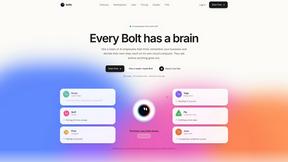
Bolts
AI employees with a brain that think, remember your business and work 24/7 on their own cloud computers.
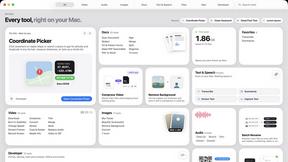
Toolbox
96 private Mac tools in one app: compress video, sign PDFs, remove backgrounds, transcribe. Offline, no account, pay once.

Safe Outreach
AI-powered platform that evaluates the safety of LinkedIn automation tools and helps reduce the risk of account restrictions.

Xobito
WhatsApp CRM, broadcasts, chatbot and shared inbox for teams — free seats, 0% markup on Meta's rates.

Outstanding Tiny Desk AI
Upload photos of you and up to 4 friends and get a 15-second Outstanding Tiny Desk AI video with AI-generated sound, in 9:16 for TikTok and Reels.

Tip Toeing in My Jordans
Put your photo in the viral Rumpelstiltskin tip toe meme and get a 12-second AI video. Free 2-second preview, no sign-up.


Datafetchpro
DatafetchPro builds custom web scrapers, browser automation bots and API pipelines to order.

NexusAi
Discover, compare, and choose AI tools, AI-powered software, prompts, workflows, and practical AI resources in one place.

Emailyy
Free email tools for signatures, subject lines, HTML previews, word counts, and email headers. Browser-based, simple to use, and no signup required.

Uniclip
Clip pages, take full-page screenshots and batch-capture list data to Notion, Feishu, Obsidian, Markdown, CSV or JSON.

TroveKey
Search tabs, Chrome bookmarks and history, run browser commands, and save webpages and social posts locally—no account.
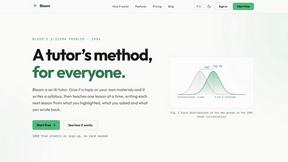
Bloom
An adaptive AI tutor that turns topics or your materials into courses, lessons, and answers tailored to how you learn.


AI Rap Video Maker
Turn a photo into a rap performance — a silent stage clip or an original 10–15s rap video with your own lyrics, beat style and voice direction.
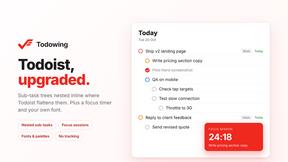
Todowing
Chrome extension that shows nested sub-tasks inline in Todoist's Today, Upcoming, Filters, Labels and Boards views, up to four levels deep.


ROIpad
ROIpad delivers live competitive intelligence for SaaS teams. Track competitor moves and market signals to uncover messaging angles that drive revenue

About Caesura Alternatives
Caesura is a macOS menu-bar application designed to promote physical well-being for individuals who spend extended hours working at a desk. It falls under the intersection of productivity, health, and personal development, offering gentle reminders to drink water, stretch, rest the eyes, and practice breathing exercises. Users often seek alternatives to Caesura for a variety of reasons, including a preference for a one-time purchase over a subscription model, a need for cross-platform compatibility with Windows or Linux, or a desire for more granular control over reminder intervals and notification styles. Others may find that the app’s minimalist, coalescing approach to break management does not align with their specific workflow, or they may require deeper integration with other health tracking ecosystems. When evaluating an alternative to Caesura, it is important to prioritize features that directly address your physical health habits and your tolerance for interruption. Key considerations include the ability to set independent schedules for different break types, such as hydration, posture checks, and eye rest. Look for software that offers a non-intrusive notification system, ideally one that can merge or postpone reminders to avoid overwhelming you during focused work. Platform compatibility is also critical; ensure the solution works natively on your operating system and offers a clean, clutter-free interface that does not require account creation or complex setup. Finally, consider the pricing model and whether the tool provides a free trial or a lifetime license that fits your budget.
FAQs about Caesura Alternatives
What is Caesura?
Caesura is a calm macOS menu-bar break manager designed for people who spend long days at a desk. It provides timely reminders to drink water, walk, stretch your wrists, rest your eyes, check your posture, and breathe, each on its own independent schedule. When two reminders fall close together, Caesura coalesces them into one gentle break to avoid interrupting your workflow twice in a row. The app requires no accounts and is free of clutter, focusing solely on helping you stay healthy without breaking your focus.
Who is Caesura for?
Caesura is specifically built for anyone working long hours at a desk, including remote workers, software developers, writers, designers, and other professionals who spend extended periods in front of a computer. It is ideal for individuals who want to maintain healthy habits like regular hydration, stretching, and eye rest but struggle to remember to do so during focused work. The app is also suitable for those who prefer a minimalist, non-intrusive tool that does not require account creation or complex configuration.
Is Caesura free?
Caesura offers a free 14-day trial, allowing users to test its full set of features before committing to a purchase. After the trial period, a paid license is required to continue using the app. The pricing model is designed to be straightforward, with no hidden fees or mandatory account sign-ups during the trial. This approach gives users ample time to evaluate whether the app’s gentle break management style fits their daily routine.
What are the main features of Caesura?
Caesura provides independent schedules for six types of reminders: drinking water, walking, stretching wrists, resting eyes, checking posture, and breathing exercises. Its standout feature is intelligent coalescing, which combines two reminders that fall close together into one single break, preventing double interruptions. The app operates entirely from the macOS menu bar with a clean, clutter-free interface and requires no user accounts or personal data. It focuses on delivering timely, gentle nudges that support long-term health without disrupting productivity.