
LoadTester
LoadTester is a modern HTTP and API load testing tool that runs distributed performance checks from your browser or CI/CD pipeline with live.
Visit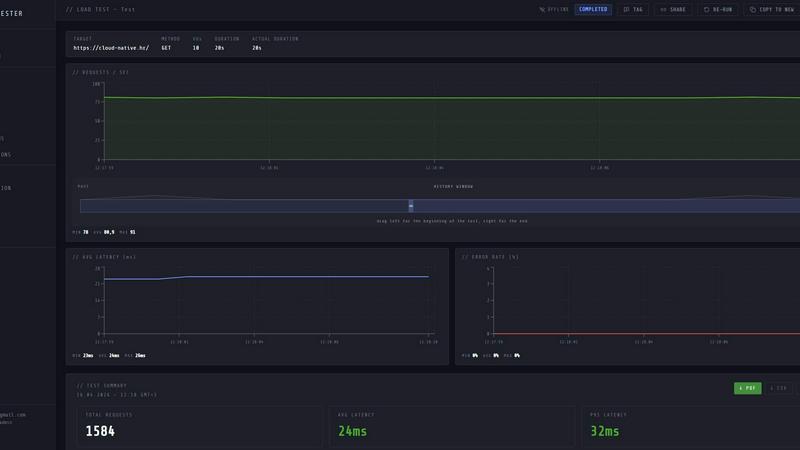
About LoadTester
LoadTester is a modern, cloud-native HTTP and API load testing tool designed by Cloud Native d.o.o. for engineering teams that require repeatable, reliable performance checks without the overhead of managing infrastructure. The platform enables developers and QA engineers to create, execute, and analyze load tests directly from their browser or through CI/CD pipelines, eliminating the need to provision servers, configure worker nodes, or orchestrate distributed test environments. With the ability to handle up to 10,000 virtual users and 10,000 requests per second, LoadTester provides enterprise-grade performance testing capabilities even on its free plan. The tool offers live analytics during test execution, including real-time throughput, latency distribution at p50, p95, and p99 percentiles, error rates, and active user counts. After a test completes, users can review comprehensive results, compare runs against baselines, and export data in PDF, CSV, or JSON formats. LoadTester also includes smart features like auto-stop thresholds, scheduled tests, webhook integrations, and Slack or email alerts to catch performance regressions before they impact end users. The platform is built for teams that want simple, repeatable performance checks embedded into their development workflow, from spike testing checkout endpoints to establishing nightly release gates. With a cold start time under three seconds and zero infrastructure to provision, LoadTester removes the friction traditionally associated with performance testing, allowing teams to ship with confidence and prove capacity before launch.
Features of LoadTester
Instant Execution and Distributed Workers
LoadTester launches distributed load tests in under three seconds from cold start to first request, with zero infrastructure setup required. The platform automatically scales worker nodes based on the test configuration, handling worker orchestration, scheduling, and execution flow behind the scenes. Teams can simply create a test, choose between virtual user mode or requests per second mode, set the target URL and duration, and hit run. The system dispatches workers instantly, with no queue time, enabling engineers to run ad-hoc tests whenever needed without waiting for resource provisioning or dealing with scheduling headaches.
Live Analytics and Real-Time Monitoring
During test execution, LoadTester provides a live streaming dashboard that displays critical performance metrics in real time, not five minutes after the run completes. Engineers can watch throughput measured in requests per second, latency distribution across p50, p95, and p99 percentiles, error counts, and active virtual user counts update continuously. The latency distribution graph shows trends over the last 60 seconds, allowing teams to spot performance degradation or bottlenecks as they happen. This immediate visibility enables faster debugging and informed decision-making during the test itself.
Smart Auto-Stop Thresholds and Guardrails
LoadTester allows users to define intelligent guardrails that automatically stop tests when predefined conditions are breached. Teams can set thresholds for maximum p95 latency, maximum error rate percentage, and regression limits compared to baseline runs. When a threshold is breached, the system can auto-stop the test to prevent unnecessary resource consumption or further degradation. Additionally, users can configure webhooks to trigger on test completion, sending result links to release bots, and set up Slack and email notifications for regression alerts exceeding configurable percentages like 15 percent above baseline.
CI/CD Integration and Automation
LoadTester is built for seamless integration into modern development workflows, supporting API access, webhooks, and scheduled test execution. Teams can run tests automatically on every deployment, establish nightly release gates with daily scheduled tests at specified UTC times, and integrate results directly into their CI/CD pipeline. The platform provides export capabilities in PDF, CSV, and JSON formats, making it easy to share results with stakeholders or feed data into other monitoring and analytics tools. This automation ensures that performance testing becomes a repeatable, consistent part of the development lifecycle rather than an occasional manual effort.
Use Cases of LoadTester
Spike Testing for E-Commerce Checkout Flows
E-commerce teams can use LoadTester to simulate sudden traffic spikes on critical checkout endpoints, ensuring the application can handle peak loads during sales events or promotional campaigns. By creating a test targeting the checkout API with 500 requests per second over a five-minute duration, engineers can observe real-time latency metrics and error rates. The live analytics reveal whether p95 latency stays within acceptable limits under stress, and the auto-stop thresholds prevent prolonged degradation if the system fails. Teams can compare results against baseline runs to detect performance regressions introduced by recent code changes.
Baseline Performance Monitoring for API Endpoints
Engineering teams can establish daily or weekly baseline performance tests for their core API endpoints, such as authentication, search, or data retrieval services. By scheduling tests to run automatically at specific times, teams create a historical record of performance metrics that can be compared over time. When a new deployment causes p95 latency to increase by more than 15 percent compared to the baseline, LoadTester can trigger Slack and email alerts, allowing the team to investigate and roll back if necessary before users notice any slowdown. This proactive monitoring catches regressions early in the development cycle.
Release Gate Validation in CI/CD Pipelines
DevOps teams can integrate LoadTester into their continuous integration and continuous deployment pipelines to enforce performance gates before code reaches production. When a developer pushes a change, the CI/CD system can trigger a LoadTester API call to run a predefined test against the staging environment. If the test fails due to latency threshold breaches or error rate spikes, the pipeline can automatically block the deployment and notify the team. This ensures that only code meeting performance standards is released, reducing the risk of production incidents caused by performance degradation.
Capacity Planning for New Feature Launches
Product and infrastructure teams can use LoadTester to validate capacity before launching new features or scaling existing services. By running tests with increasing virtual user counts or request rates, teams can determine the maximum throughput their application can handle while maintaining acceptable latency. The results provide concrete data points for capacity planning, such as the maximum RPS before p99 latency exceeds service-level objectives. Teams can export these results as PDF or CSV reports to share with stakeholders during launch planning meetings, providing evidence-based confidence in the system's ability to handle expected traffic.
Frequently Asked Questions
How does LoadTester handle infrastructure and worker scaling?
LoadTester eliminates all infrastructure management by running distributed load tests from the cloud. When you create and launch a test, the platform automatically provisions and scales worker nodes based on your test configuration, whether you choose virtual user mode or requests per second mode. Workers are dispatched in under three seconds with zero queue time, and the system handles all coordination, execution flow, and cleanup. You never need to provision servers, configure load generators, or manage scaling yourself.
What types of tests can I run with LoadTester?
LoadTester supports HTTP and API load testing for GET, POST, PUT, and DELETE methods. You can target any HTTP or HTTPS endpoint, including REST APIs, GraphQL endpoints, and web applications. Tests can be configured in two modes: Virtual Users mode, which simulates a specific number of concurrent users, and Requests Per Second mode, which maintains a constant throughput rate. You can set custom durations, define thresholds for latency and error rates, and schedule tests to run automatically on a recurring basis.
Can I integrate LoadTester with my existing CI/CD pipeline?
Yes, LoadTester provides API access and webhook integrations that allow seamless integration with any CI/CD pipeline. You can trigger tests programmatically from tools like Jenkins, GitHub Actions, GitLab CI, or CircleCI. The platform also supports webhooks on test completion, enabling you to send result links to release bots, Slack channels, or email. Scheduled tests can be configured to run daily at specific UTC times, making it easy to establish automated performance gates as part of your deployment workflow.
What happens when a test exceeds the defined thresholds?
LoadTester features smart auto-stop capabilities that automatically halt a test when predefined thresholds are breached. You can configure thresholds for maximum p95 latency, maximum error rate percentage, and regression limits compared to baseline runs. When a threshold is exceeded, the test stops immediately to prevent unnecessary resource consumption. The platform can also send notifications via Slack and email when regressions exceed configurable percentages, such as 15 percent above baseline. All threshold configurations are saved per test, making them reusable across multiple runs.
Pricing of LoadTester
LoadTester offers a free plan that allows teams to start running load tests immediately without any upfront commitment. The free plan includes access to core features such as distributed execution, live analytics, and basic threshold configuration. For teams requiring higher throughput limits, advanced automation features, or dedicated support, LoadTester provides paid pricing tiers that scale with usage. Specific pricing details for paid plans can be found on the LoadTester website under the pricing section, where users can view limits, compare features, and choose the plan that best fits their team's needs. The platform also offers enterprise options for organizations with custom requirements, including dedicated worker pools, priority support, and advanced security compliance.
Similar to LoadTester


MCP servers that give Claude and Cursor the data they can't reach. Your saved posts, live SEO data, asked in plain English.


1000+ browser-based developer utilities for formatting, encoding, crypto, and testing. All processing runs locally.

Ornold MCP lets AI agents control Chromium and antidetect browsers: click, type, read screens, record workflows, replay profiles without scripts.

AIQualityHQ instantly evaluates and improves your AI prompts with deterministic scores and actionable fixes across six key quality dimensions.

Managed remote build cache for Nx, Lerna, Turbo, Gradle, and Bazel. Reuse artifacts across CI and developer machines.

Public URLs for localhost without downloading any binary.