
retroshelf
Retroshelf automatically logs your retro handheld gaming sessions, letting you track playtime, discover trends, and connect with other players.
Visit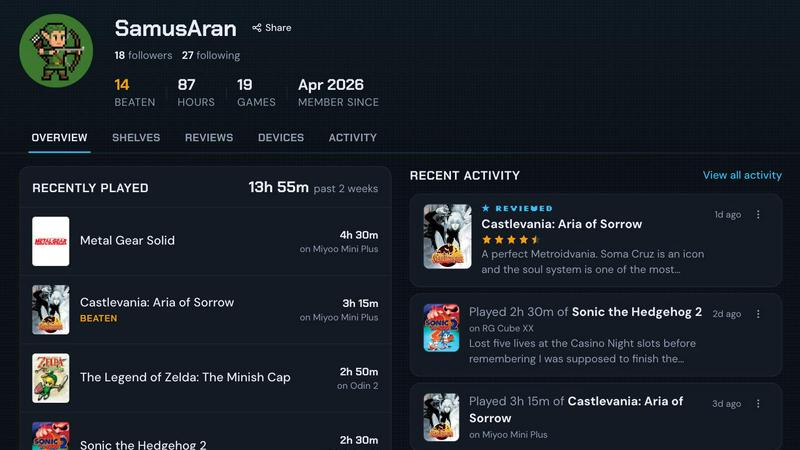
About retroshelf
retroshelf is an innovative play-tracking and discovery application specifically designed for retro handheld gaming enthusiasts. It solves a fundamental problem for players who own multiple devices like the Miyoo, Anbernic, and Odin handhelds: keeping a coherent record of what they have played, finished, replayed, and reviewed across all their hardware. Instead of relying on fragmented notes, spreadsheets, or memory, retroshelf provides a unified, browsable history of every gaming session. The core of the product is a tiny plugin that runs directly on a supported handheld device. This plugin automatically captures essential session details including the game title, playtime, and the specific handheld used. This data is then synced to the user's public "shelf," which showcases their current gaming activity, completed titles, ongoing reviews, and replay sessions, all while maintaining the context of which device was used. For the retro gaming community, retroshelf is more than a personal log; it is a discovery platform. Users can browse the shelves of other players to see which games are trending, which devices are popular for specific titles, and how long others are playing. This transforms individual gaming habits into a shared, community-driven experience. The product is currently in a closed beta phase, inviting passionate retro handheld players to help shape the community from its earliest stages. retroshelf is built for anyone who values remembering their gaming journey and wants to connect with a like-minded community focused on portable, retro gaming.
Features of retroshelf
Automatic Session Logging
A tiny, lightweight plugin runs directly on your supported retro handheld device, such as those running muOS or OnionOS. Every time you play a game, the plugin automatically captures the session details: the game title, the exact minutes played, and the specific handheld device you are using. This eliminates the need for manual note-taking or timers. The data is synced seamlessly to your retroshelf profile, ensuring your log is always up to date without any effort on your part.
Public Shelf with Device Context
Your personal shelf is a public showcase of your gaming activity, organized into clear categories: currently playing, finished, reviewing, and replaying. The key differentiator is that every entry retains its device context. Visitors can see not only what you played, but exactly which handheld you used for that session. This creates a rich, contextual history that is far more informative than a simple list of game titles, allowing for deeper reflection and community comparison.
Browsable Timeline of Play
retroshelf transforms scattered gaming sessions across multiple handhelds into a coherent, browsable timeline. You can look back at your entire year of play, seeing exactly what you played, on which device, and for how long. This feature makes your gaming journey legible and memorable. It turns a collection of isolated play sessions into a narrative you can revisit, analyze, and share with others, providing a satisfying sense of progress and history.
Community Discovery and Filtering
The platform serves as a discovery engine for retro games. You can browse the shelves of other players to see what games are popular this week, which titles are being finished or replayed most frequently. A powerful filtering system lets you narrow results by specific devices, such as Miyoo, Anbernic, or Odin. This allows you to see how a game performs on a specific handheld or find new titles that are trending within the community you care about.
Reviews with Handheld Context
When users leave star ratings and reviews on retroshelf, the rating is always paired with the handheld they were playing on. This provides far more useful information than a generic score. A game might be a five-star experience on one device but a three-star experience on another due to performance or controls. This contextual review system helps other players make informed decisions about which games to try on their own specific hardware.
Use Cases of retroshelf
Tracking a Multi-Device Gaming Library
A collector who owns three different retro handhelds (e.g., a Miyoo Mini for portability, an Anbernic RG35XX for comfort, and an Odin for higher-end emulation) can use retroshelf to automatically log every session across all devices. Instead of wondering where they left off or which game they were playing on which device, they can simply check their unified timeline. This provides a single source of truth for their entire gaming habit, eliminating confusion and ensuring no session is forgotten.
Discovering New Games Through Community Shelves
A player looking for their next retro title can browse the "Popular this week" section on retroshelf. They can see exactly what other handheld players are picking up, finishing, and replaying. By filtering by their specific device model, they can discover games that are known to run well and be enjoyable on their hardware. This transforms the discovery process from random searching into a targeted, community-validated exploration of the best titles for their setup.
Sharing and Comparing Gaming Habits with Friends
A group of friends who all use retro handhelds can use retroshelf to share their public shelves. They can see what each other is currently playing, compare playtimes for the same game, and see who has finished a title first. The device context adds a fun layer of comparison, showing who is using which hardware for different genres. This turns a solitary hobby into a shared social experience, fostering friendly competition and conversation.
Creating a Personal Gaming Journal for Reflection
A player who values nostalgia and reflection can use retroshelf as a detailed personal journal of their gaming year. The browsable timeline allows them to look back at the end of the year and see precisely what they played, on which device, and for how long. They can leave notes on their sessions, creating a rich, personal archive. This use case is for the player who wants to remember not just the games they loved, but the context and journey of playing them.
Frequently Asked Questions
How does the automatic session logging work?
The logging is handled by a small plugin that you install on your handheld device's SD card. This plugin is currently supported on devices running muOS and OnionOS. Once installed and linked to your retroshelf account, it runs silently in the background. When you start a game, it detects the title and begins tracking playtime. When you stop playing, it logs the session data, including the game, duration, and device, and syncs it to your shelf automatically.
Is my gaming shelf public by default?
Yes, retroshelf is designed as a community platform, so your shelf is public by default. This allows other users to browse your activity, discover what you are playing, and see the devices you use. The public nature of the shelf is a core feature for discovery and community interaction. You can manage your profile and visibility settings through your account dashboard if you wish to control what is shown.
What devices and operating systems are currently supported?
Currently, retroshelf supports handheld devices running muOS and OnionOS. These are popular custom firmware options for devices like the Miyoo Mini Plus, Anbernic RG35XX series, and similar retro handhelds. The development team is actively working on expanding support to other operating systems and devices. You can check the "Plugins" or "Devices" section of the website for the most up-to-date list of supported hardware.
What is the closed beta and how can I join?
The closed beta is an early access period for retroshelf. The team is opening the platform in small waves to passionate retro handheld players who want to help shape the community from the beginning. To join, you can sign up on the retroshelf website using the "Join beta" button. Access is granted in waves, so signing up places you on a waiting list. Being an early beta tester allows you to influence the product's direction and features.
Explore more in this category:
Similar to retroshelf

Independent, source-checked guide to the Dear Passengers game.

1000+ browser-based developer utilities for formatting, encoding, crypto, and testing. All processing runs locally.

Free browser physics destruction game with 100 handcrafted levels. Aim a cannon, topple structures, trigger chain reactions, and clear every target.

Caesura is a macOS menu-bar app that reminds you to drink water, stretch, rest your eyes, and breathe, pausing during calls.

PrettyScale provides free, private AI tools for face analysis including symmetry scoring and celebrity look-alikes that run entirely in your browser.

Burge Coffee is a free, browser-based platform for home roasters to learn the craft, track every batch, and discover the world's best small roasters.

On Music AI transforms text, lyrics, or ideas into complete songs with vocals, beats, and instrumentals in minutes.

Bloom Plant ID identifies plants, diagnoses diseases, and provides customized care reminders to help you grow with confidence.