
Very Good Calendar Sync
Very Good Calendar Sync seamlessly aligns your work, personal, and client calendars while keeping your data private and secure.
Visit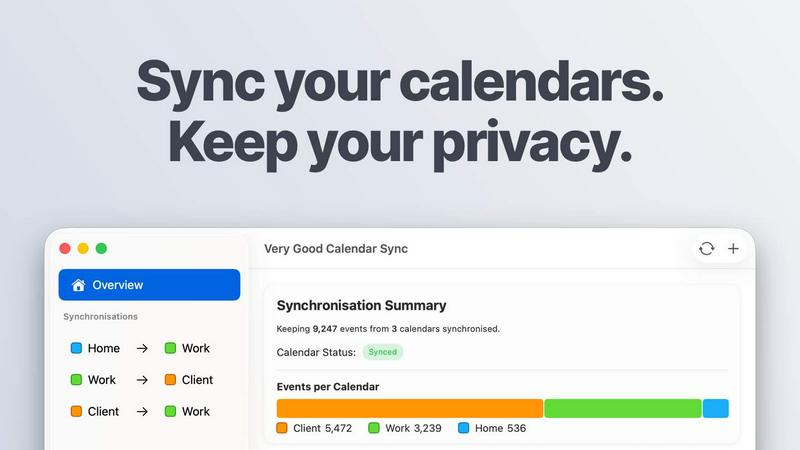
About Very Good Calendar Sync
Very Good Calendar Sync is an innovative macOS application designed to seamlessly synchronize multiple calendar accounts while prioritizing user privacy and data security. By connecting your work, personal, and client calendars, this tool ensures that scheduling conflicts become a thing of the past. The main value proposition lies in its ability to automate calendar synchronization without requiring users to share sensitive login credentials or rely on third-party cloud services. Ideal for consultants, freelancers, and busy professionals, Very Good Calendar Sync eliminates the hassle of managing multiple calendars by allowing users to configure their sync preferences easily. With just a one-time setup, the app operates quietly in the background, providing real-time updates and ensuring that your availability is always accurately reflected across all your calendars.
Features of Very Good Calendar Sync
Automatic Background Synchronization
Once set up, Very Good Calendar Sync automatically monitors your calendars for changes and synchronizes them in the background. This means that any new events or updates on your work calendar will instantly reflect on your personal calendar without any manual intervention.
Privacy-First Design
Your calendar data remains entirely private as the application operates directly on your Mac. There is no data stored externally, no third-party access, and no need for cloud storage, ensuring that your sensitive information stays secure and local.
Customizable Sync Rules
The app allows users to define specific synchronization rules based on their preferences. You can choose to sync only on weekdays, set working hours, and even specify which details of your events to share, such as title, description, and location, to maintain your privacy.
Compatibility with Multiple Calendars
Very Good Calendar Sync works with any calendar integrated into macOS Calendar.app, including Google Calendar, Microsoft Outlook, and Apple iCloud. This wide compatibility allows users to synchronize all their calendars without having to deal with complex setups or third-party integrations.
Use Cases of Very Good Calendar Sync
For Consultants and Freelancers
Consultants and freelancers can keep their client calendars in sync effortlessly, avoiding the common issue of double-booking and ensuring that no appointments are missed. This tool simplifies the management of various client schedules, streamlining workflow and enhancing productivity.
For Busy Professionals
Employees juggling multiple calendars can use Very Good Calendar Sync to manage their work and personal schedules seamlessly. By keeping all appointments aligned, users can avoid conflicts, ensuring they never miss important personal or professional commitments.
For Teams and Agencies
Cross-functional teams and agencies can benefit from synchronized calendars by ensuring that all team members are aware of each other's availability in real-time. This clarity helps in planning meetings and collaborative efforts without confusion or scheduling conflicts.
For Individuals Seeking Clarity
Individuals who simply want their calendar to reflect their true availability will find this app invaluable. The ability to show only when one is busy, while keeping event details private, helps maintain personal boundaries while managing commitments effectively.
Frequently Asked Questions
Do you store any of my calendar data?
No, Very Good Calendar Sync does not store any of your calendar data. All synchronization occurs locally on your Mac, ensuring that your information remains private and secure.
Which calendar providers are supported?
The app supports any calendar accessible through macOS Calendar.app, including Google Calendar, Microsoft Outlook, Apple iCloud, and any CalDAV account, providing extensive compatibility for users.
Does it sync when my Mac is off or asleep?
No, synchronization only occurs when your Mac is active. The app relies on your Mac's capabilities to access calendars, so it needs to be awake to process any updates or changes.
Is this app available for Windows?
Currently, Very Good Calendar Sync is only available for macOS users. There are no current plans for a Windows version, as the application is designed to work closely with macOS Calendar.app.
Explore more in this category:
Similar to Very Good Calendar Sync

AI interview platform to screen resumes, run 10-language voice interviews, and rank top talent automatically.

A free launch checklist for SaaS, apps, AI tools and more. Every step says why it matters and when you can skip it.

Free collection of online developer utilities, code formatters, and digital converters designed to streamline your daily workflow.

Discover 50,000+ ready-to-use AI prompts for text, image, and video generation. Save time and create better results with AI.

The #1 Native Form Builder Plugin for Framer - No Code, No Embeds, No External Platforms.


Tally Counter is a simple online counting tool for tracking attendance, workouts, inventory, sports scores, visitors, and everyday activities.

Create once, tailor for each platform, and schedule posts across 14 social networks from one simple dashboard.